Open the AVD Manager
suggest changeOnce the SDK installed, you can open the AVD Manager from the command line using android avd.
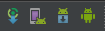
You can also access AVD Manager from Android studio using Tools > Android > AVD Manager or by clicking on the AVD Manager icon in the toolbar which is the second in the screenshot below.
Found a mistake? Have a question or improvement idea?
Let me know.
Table Of Contents