Introduction to Transformations
suggest changeTransformations alter a given point’s starting position by moving, rotating & scaling that point.
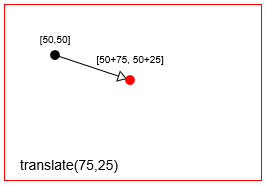
- Translation: Moves a point by a
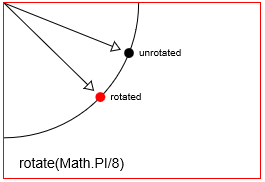
distanceXanddistanceY. - Rotation: Rotates a point by a
radian anglearound it’s rotation point. The default rotation point in Html Canvas is the top-left origin [x=0,y=0] of the Canvas. But you can reposition the rotation point using translations. - Scaling: Scales a point’s position by a
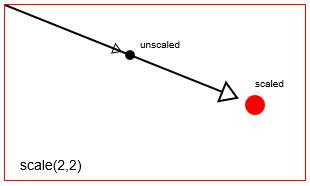
scalingFactorXandscalingFactorYfrom it’s scaling point. The default scaling point in Html Canvas is the top-left origin [x=0,y=0] of the Canvas. But you can reposition the scaling point using translations.
You can also do less common transformations, like shearing (skewing), by directly setting the transformation matrix of the canvas using context.transform.
Translate (==move) a point with context.translate(75,25)
Rotate a point with context.rotate(Math.PI/8)
Scale a point with context.scale(2,2)
Canvas actually achieves transformations by altering the canvas’ entire coordinate system.
context.translatewill move the canvas [0,0] origin from the top left corner to a new location.context.rotatewill rotate the entire canvas coordinate system around the origin.context.scalewill scale the entire canvas coordinate system around the origin. Think of this as increasing the size of every x,y on the canvas:every x*=scaleXandevery y*=scaleY.
Canvas transformations are persistent. All New drawings will continue to be transformed until you reset the canvas’ transformation back to it’s default state (==totally untransformed). You can reset back to default with:
// reset context transformations to the default (untransformed) state
context.setTransform(1,0,0,1,0,0);
Found a mistake? Have a question or improvement idea?
Let me know.
Table Of Contents